Structural Steel Estimating Software
theTakeoff reads your steel drawings and returns a takeoff you can audit line by line. Count every member, measure every length, and reconcile the drawings against the schedule and the RFP package.
Early access. Structural Steel is next on the roadmap, pipe racks first. Join the list to shape it.
Every member tagged, measured, and traced back to the sheet it came from.
Estimate Structural Steel From The Drawings, Not By Hand
A steel package is thousands of members across dozens of sheets. Counting and measuring it by hand is where the hours go, and where a missed brace or a wrong section weight hides until it costs you the bid. theTakeoff does the same three jobs your estimator does, on every sheet, and shows its work.
Count everything on the drawing
Beams, columns, braces, connections, base plates, and bolts, pulled off every sheet and tallied by mark and section. No member left off the count because someone lost their place at 6 p.m.
Measure what is drawn
Lengths off the geometry, weights off the section schedule. Tonnage by mark, by member type, and by area, so your bulk steel and your connection material both come from the same read.
Catch the deviations
The engine reconciles the drawings against the steel schedule and the RFP package, and flags where they disagree. You see the mismatch at bid time, not after the shop has already cut steel.
Section weights and shapes, straight from the tables
Guesswork on a section weight moves your tonnage, and tonnage moves your price. theTakeoff reads the mark against the AISC Steel Construction Manual shapes, so a W21x62 is 62 pounds per foot every time, not whatever got typed into last year's spreadsheet.
- Section weights keyed to AISC shape designations
- Wide flange, channel, angle, HSS, and plate handled by type
- Connection material and bolts factored, not forgotten
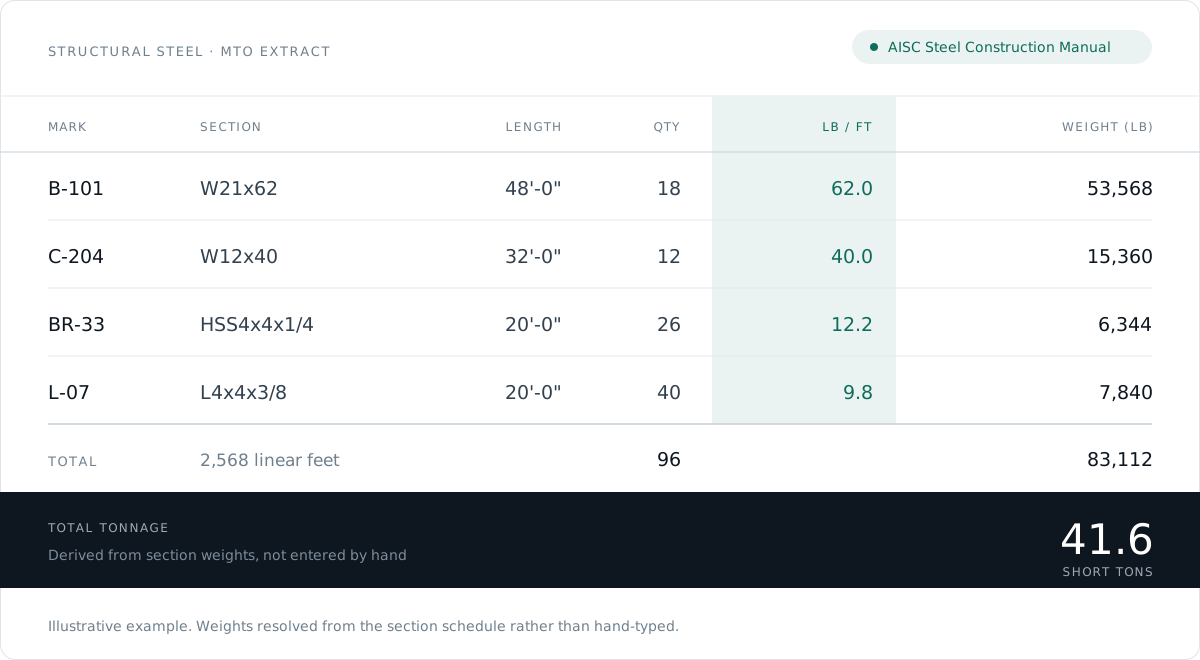
Illustrative example. Section weights are keyed to AISC shape designations and multiplied by length and piece count, so tonnage is derived rather than typed.
Structural Steel Fabrication Estimating Needs a Different Cut of The Same Count
A fabricator prices shop hours, so the quantities that matter are pieces by mark, cut lengths, weld inches, and connection material. An erector prices crane and crew days, so the same package has to come out sliced by area, by piece weight, and by connection type.
theTakeoff produces the quantity side of both, and your own labor rates and shop standards stay yours. The engine gives you the counts and measurements with a source behind each one, and your estimator applies the hours.
- Quantities exportable by mark, by shape, and by area
- Connection material factored from the connection type and the member schedule
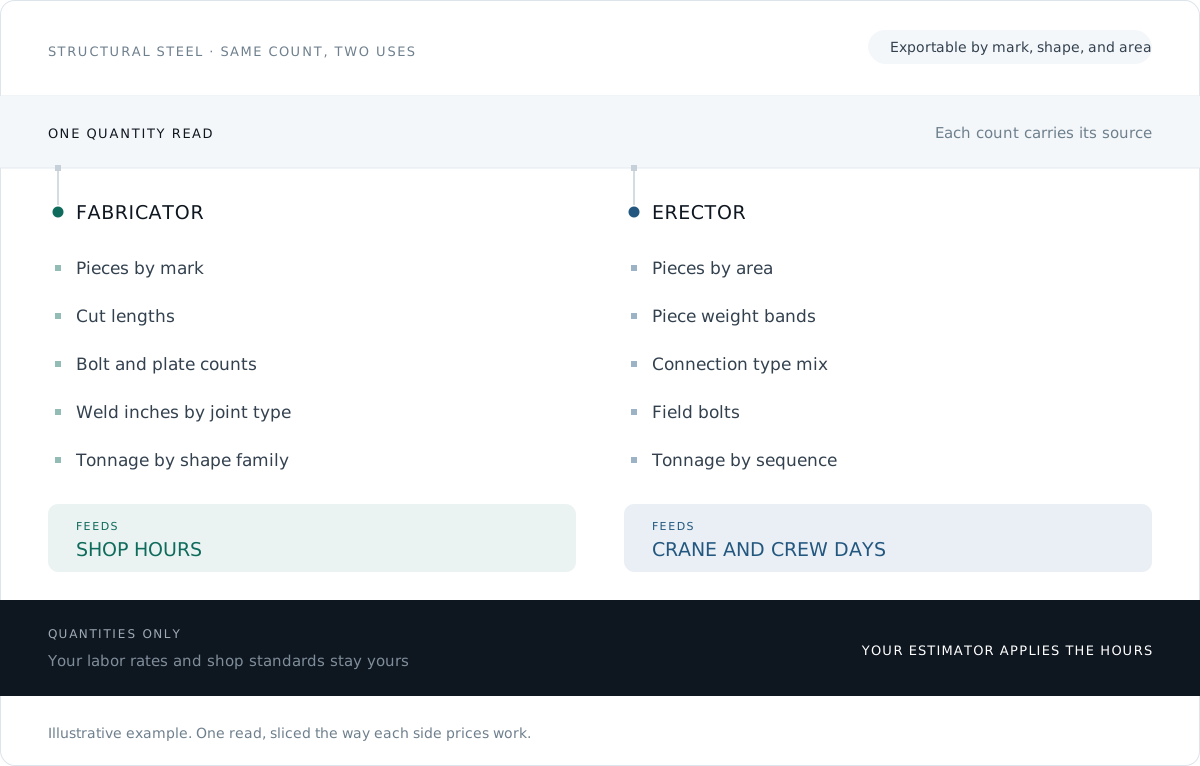
Illustrative example. One read, sliced the way each side prices work. The quantities are the product; the hours are yours.
Click any number, see exactly where it came from
Estimators do not stake a bid on a black box. Every count and every length in theTakeoff traces back to the member on the sheet it was read from, with the standard and the rule that produced it sitting right next to the figure.
The estimator still owns the number that goes in the bid. The tool takes the counting off the desk and leaves a trail you can defend in a scope review.
- Every figure links to its member and its source sheet
- Adjust a count in one click and keep the audit trail
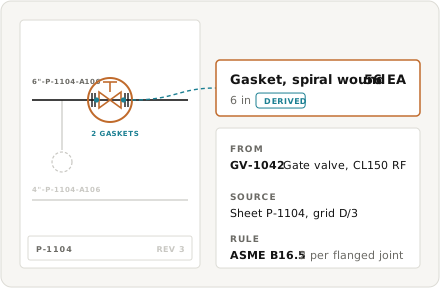
Illustrative example. A derived item traces back to the thing on the drawing that produced it.
The Bids Keep Coming. The Estimators To Price Them Do Not.
Steel work is not slowing down, but the bench of estimators who can take off a package by hand is thinning every year, and the ones you have are the constraint on how many jobs you can chase. When a package takes days to count, you bid fewer of them, and you pass on work you could have won. Software that does the counting turns a fixed-capacity desk into one that can look at more work without more hires.
Capacity, not opportunity, sets the ceiling on how much you can bid.
Trusted by 200+ enterprises across EPC, Infrastructure, and Energy











Reference The Estimating Library
Practical takeoff references, charts, and workflow guides, built for working estimators.
Steel takeoff basics
How to read a steel package and build the count.
AISC section weights
Wide flange, HSS, angle, and channel weights per foot.
Bolt and plate factoring
Estimate connection material without counting each bolt.
Tonnage by area
Break a package into biddable zones and roll it up.
Related estimating resources
Structural Steel Estimating Software
What does structural steel estimating software do?
It reads your steel drawings and produces the takeoff for you. theTakeoff counts every member by mark and section, measures lengths off the geometry, pulls section weights from the schedule to roll up tonnage, and reconciles the drawings against the steel schedule and the RFP package so mismatches surface at bid time.
How are section weights determined?
Weights are keyed to the AISC Steel Construction Manual shape designations. A W21x62 reads as 62 pounds per foot, a W12x40 as 40, and so on, so your tonnage comes from the standard tables rather than from numbers typed into a spreadsheet by hand.
Can I check where a number came from?
Yes. Every count and length traces back to the member on the sheet it was read from, with the source sheet, grid location, and the rule shown next to the figure. You can click a number, land on the exact member, and adjust it in one click while keeping the audit trail.
Does it handle connections, plates, and bolts?
Connection material is factored rather than counted bolt by bolt. Base plates, gussets, and bolts are estimated from the connection type and member schedule, which is how an estimator prices bulk connection material without itemizing every fastener.
Is structural steel available now?
Piping and P&ID takeoff are live today. Structural steel is next on the roadmap, with pipe racks first. Join the early access list to get it as it ships and to help shape what gets built.