Material Takeoff Software
Material takeoff software that reads your drawings and returns the full material list, not just the components you can see on the sheet. This page covers what an automated MTO actually contains, why the derived items are where hand takeoffs lose money, and which drawing formats a machine read handles.
Runs in the browser. Nothing to install. Live today for P&ID and piping, with structural steel
Every member tagged, measured, and traced back to the sheet it came from.
What Material Takeoff Software Does to a Drawing Set
A material takeoff is three jobs done thousands of times, and the reason it eats days is repetition rather than difficulty. Someone reads the sheet, someone counts what is drawn on it, and someone works out everything else the spec says goes with what is drawn. That third job is the one people underestimate and the one a machine is genuinely good at.
Read the Set
Plans, sections, line lists, schedules, and specs ingested together, so the engine works from the same package your estimator does. Vector PDFs, scanned sheets, and the revision somebody dropped into the folder without telling anyone.
Build the Full Material List
Components counted by tag, lengths measured off the geometry, and derived items resolved from the spec. A 6 inch CL150 flanged valve is one line on the drawing and five lines on the MTO once the gaskets and stud bolts are in. Automated material takeoff means those five lines appear without anyone remembering to add them.
Export a Priceable MTO
The result comes out structured by tag with descriptions, sizes, quantities, and units, exported to Excel and ready to drop into your price book. Every row carries a link back to the spot on the drawing it was read from, so the file is checkable rather than a wall of numbers.
The Items Nobody Draws Are the Ones You Miss
Counting what is drawn is the easy half. The valve is on the sheet, so it gets counted. The two gaskets and the stud bolt set that the flange class requires are not drawn anywhere, so they get remembered, or they do not. Across a full package the derived items run 35 to 55 percent of the line count, and they are the quietest way to lose money on a bid because nothing on the drawing tells you they are missing. theTakeoff resolves them from the standards your specs already reference, so ASME B16.5 flange classes drive the bolt and gasket counts, B31.3 drives wall and schedule logic, and the AISC manual drives steel section weights.
- Derived items resolved from published class and schedule tables
- The rule that produced a line is shown next to the line
- Ambiguous sizes and unreadable tags get flagged rather than filled in silently
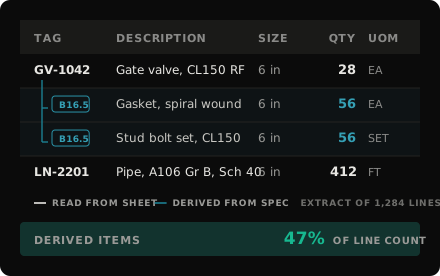
Derived items resolved from the spec rather than added from memory.
Click Any Line and See Where It Came From
On-screen material takeoff was a real improvement on paper and a highlighter, and it is still what most estimators use. It gave you measuring tools over a PDF without touching the reading, so you are the one identifying every component and deciding what it is. Digital material takeoff of that generation sped up the clicking. A machine read produces the list itself and hands it over for verification, which moves your hours from counting to checking. That only pays off if you can see what the machine saw.
So every quantity traces back to the component on the sheet it was read from, with the source sheet, the location, and the rule that produced the line sitting right next to it. A derived gasket shows the flange it came from and the class that set the count. The engine produces the first pass, your estimator corrects what is wrong, and those corrections sharpen the read on the next package. We measure accuracy per item class and report what we measure, because one blended percentage tells you nothing about the class carrying your money.
- Every line links to its component and its source sheet
- Correct a quantity in one click and the audit trail keeps the change
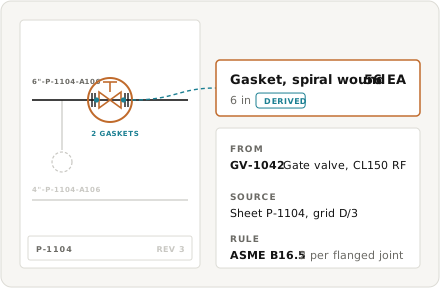
Illustrative example. Click a line, land on the exact component.
The bids keep coming. The estimators to price them do not.
A 300-sheet P&ID package eats more than 250 estimator hours before anyone has priced a thing, and a full isometric takeoff on a typical refinery bid runs about 875. Those hours are the ceiling on how many jobs you chase. The bench of people who can build a material list by hand gets thinner every year, so the ceiling drops while the bid volume does not. When a package takes days to count, you bid fewer of them and pass on work you could have won.
Capacity, not opportunity, sets the ceiling on how much you can bid.
Trusted by 200+ enterprises across EPC, Infrastructure, and Energy











Reference the Estimating Library
Takeoff references, reference tables, and workflow guides, written for working estimators.
Structural Steel Estimating Software
theTakeoff reads your steel drawings and returns a takeoff you can audit line by line. Count every member, measure every length, and reconcile the drawings against the schedule and the RFP package.
/handbook/material-takeoff-template
Piping Estimating Software
Piping estimating software that reads your drawings and returns an auditable count. See what the AI actually does, how the line number becomes a priced line item, and where the estimate still needs your estimator.
/handbook/pid-takeoff-software
Material Takeoff Software
What is material takeoff software?
It turns a drawing set into a priceable material list. The software reads the sheets, counts the components, measures lengths, and derives the items the spec requires but nobody draws, then outputs the result structured by tag. Construction material takeoff software and MTO software describe the same job. A quantity takeoff stops at how much of each thing there is, and a material takeoff carries it through to the full list you would actually buy from.
What is the difference between an MTO, a BOM, and a BoQ?
An MTO is what the estimator builds off the drawings to price a bid, and it is an estimate. A bill of materials is the shop or procurement version, usually post-award and expected to be exact. A bill of quantities is a client-issued document common in the UK, the Gulf, and much of Asia, where every bidder prices the same list so the numbers compare directly. theTakeoff produces the first and exports in a structure that feeds the other two.
How is this different from on-screen takeoff?
On-screen takeoff gave you measuring tools over a PDF and left the reading to you. You identify every component, measure it, and remember what the spec says goes with it. Automated material takeoff reads the sheet and builds the list itself, then hands it over for checking. Checking runs roughly five to ten times faster than starting from a blank sheet, and that gap is the whole return.
Can it do material takeoff from PDF?
Yes, and PDFs are the design case rather than an afterthought. Most bid packages arrive as PDFs on a shared drive, some scanned, some a revision behind. 2D material takeoff off drawings is what the engine was built for. Vector PDFs read best, scans read well enough to be worth checking, and either way the output tells you which sheets it was less confident about.
Is there a material takeoff template I can use?
Yes, and it is free with no signup. The template covers the column structure a usable MTO needs, so tag, description, size, quantity, unit of measure, and a source reference against every line. That last column is the one most templates leave out and the one that saves you when somebody questions a number three weeks later.