Construction Takeoff Guide for Estimators | The Takeoff AI
A construction takeoff is the count and measure of everything a job needs, pulled from the drawings before anything is priced. What it is, how estimators do it, and what a finished takeoff looks like.
The word comes from the job. You take the quantities off the drawing. That is the whole idea.
Every member tagged, measured, and traced back to the sheet it came from.
How to do a construction takeoff
Every takeoff, on every trade, is the same three jobs done sheet by sheet across the drawing set. The trade changes what you are counting. The method does not.
Count every item that is drawn as a thing
Valves, fittings, instruments, fixtures, columns, connections. Anything the drawing shows as a discrete symbol gets tallied by type, size, and class. On a P&ID that is every ISA symbol on the sheet. On a structural sheet it is every member by mark. The count is the spine of the takeoff and it is where a missed item costs the most.
Measure every item that is drawn as a length, area, or volume
Pipe runs, cable, duct, beams, slab area, excavation. These come off the geometry: linear feet from isometrics and plans, square feet from floor plans, cubic yards from sections. Units of measure follow the trade: LF for pipe and steel, SF for finishes, CY for concrete and earth, EA for anything counted.
Derive every item that is implied but not drawn
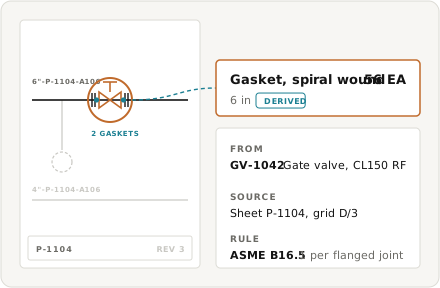
A flange on a P&ID implies a gasket and a bolt set. A butt weld implies a weld inch count. A beam implies connection plates and bolts. None of these is drawn as a symbol, and all of them go in the material takeoff. Derived items are where a hand takeoff runs out of time and where most quantity errors hide.
What comes out
The finished construction takeoff is a bill of quantities: every item, its size and spec, the unit, and the count or measure, each one tied to the sheet it came from. It carries no price. Pricing is the estimate, and it happens after. Material takeoff and quantity takeoff are the same document seen from two sides: material takeoff lists what has to be bought, quantity takeoff adds what has to be installed, so labor and equipment can be priced against it. The example on the right is one line from an industrial takeoff sheet, the way it lands in the MTO before the estimator touches a rate.
- Every line carries item, size, spec, unit, quantity, and source sheet
- Derived items sit beside the drawn items they came from
- No prices. The takeoff feeds the estimate; it is not the estimate

The takeoff is the half you can check
An estimate is a takeoff with prices on it. Material rates, labor units, productivity factors, indirects, and margin all get argued about, and reasonable estimators land on different numbers from the same quantities. The takeoff is different. A 6" Class 300 gate valve is either on the sheet or it is not. There are either fourteen of them or there are not. The quantities are the one part of a bid that can be audited against the drawing and settled.
That is why the takeoff has to trace. A quantity with no source sheet behind it is a number somebody typed. theTakeoff reads the drawing set and returns the takeoff with every line linked to the symbol and the sheet it was counted from, so the estimator can check any figure in one click before pricing it. The software question, which tools do this and how they differ, is a separate page. This one is about the work.
- Every quantity links to its symbol and its source sheet
- Change a count and the audit trail keeps the change
The takeoff is where the bid is won or lost, and it is still mostly done by hand
On an industrial package, the takeoff is the longest single task in the bid. A mid-size mechanical scope runs hundreds of P&IDs and isometrics, thousands of components, and a derived-item list that is longer than the drawn one. An estimator can spend the better part of a week counting before a rate is applied, and the bench of estimators who can do it well is shrinking. Pricing is fast once the quantities exist. The quantities are the bottleneck.
Get the takeoff wrong and no amount of pricing skill saves the bid.

Trusted by 200+ enterprises across EPC, Infrastructure, and Energy






Piping Estimating Software
Piping estimating software that reads your drawings and returns an auditable count. See what the AI actually does, how the line number becomes a priced line item, and where the estimate still needs your estimator.
PDF Takeoff Software
PDF takeoff software that reads the sheet instead of handing you a ruler. See what free and free download options really are, how scanned drawings are handled, and what the AI does with a flat PDF that has no model behind it.

Industrial Estimating Software
Industrial estimating software built for process work, where components are specified against codes and a missed spec break costs six figures. This page covers what industrial estimating needs that building-trade tools do not provide, which disciplines theTakeoff reads today, and where your own price book still does the work.
Construction Takeoff Guide for Estimators | The Takeoff AI
What is a construction takeoff?
A construction takeoff is the process of pulling the quantities a job needs off the drawings: counting every discrete item, measuring every length, area, and volume, and deriving the items that are implied but not drawn. The output is a bill of quantities with no prices on it. The name is literal. You take the quantities off the drawing.
What is the difference between a takeoff and an estimate?
The takeoff is the quantities. The estimate is the takeoff with prices applied: material rates, labor units, equipment, indirects, and margin. The takeoff can be checked against the drawing and settled. The estimate involves judgment and two estimators will land on different numbers from the same takeoff. Takeoff first, always. The estimate is only as good as the quantities under it.
What is the difference between a material takeoff and a quantity takeoff?
Mostly which side of the bid you are on. A material takeoff (MTO) lists what has to be bought: pipe, valves, flanges, steel, by size and spec. A quantity takeoff adds what has to be installed, so labor and equipment can be priced against it, such as weld counts, diameter inches, and tonnage erected. In practice the two terms overlap and on most jobs one document serves both.