What AI Takeoff Software reads P&IDs and Isometrics?
Which AI takeoff software reads P&IDs and Isometrics in 2026?
Short answer
Most AI takeoff tools only read architectural floor plans. They count doors, measure rooms and calculate wall lengths. Feed them a P&ID or an isometric and they return nothing useful. Only a handful of tools read process drawings: theTakeoff, Pathnovo, and the enterprise plant-design suites from AVEVA and Hexagon, though those last two need a 3D model first.
If you estimate industrial work, you have probably tried an AI takeoff tool and been disappointed.
You are not doing it wrong. Most of these tools were never built for your drawings.
The AI takeoff market grew up around commercial building work. Offices, schools, apartment blocks and hospitals. The drawings are floor plans. The job is measuring areas and counting fixtures. That is a real problem and these tools solve it well.
Your drawings are different. A P&ID is a logic diagram, not a scaled plan. An isometric is a single line routed in three dimensions with dimensions written along it. There is nothing to measure with a scale tool. The information sits in the tags, the line numbers and the symbols.
A tool trained to find doors on a floor plan cannot read that.
This guide sorts the market by one question: what kind of drawing can it actually read? If a tool cannot read your drawing set, nothing else about it is relevant.
The two kinds of takeoff software
Before the list, the distinction that explains everything.
Floor plan tools: These use computer vision to find shapes on a scaled architectural drawing. Rooms, walls, doors, fixtures. The output is areas, lengths and counts. Togal, STACK, PlanSwift, On-Screen Takeoff, Autodesk Takeoff, Kreo and Bobyard all sit here.
Process drawing tools: These read engineering documents. They pull line numbers, valve tags, fitting types, sizes and specs off P&IDs and isometrics, then build a material takeoff from them. This is a much smaller group.
The confusion happens because both get marketed as "AI takeoff software." The phrase covers two different products.
Quick comparison
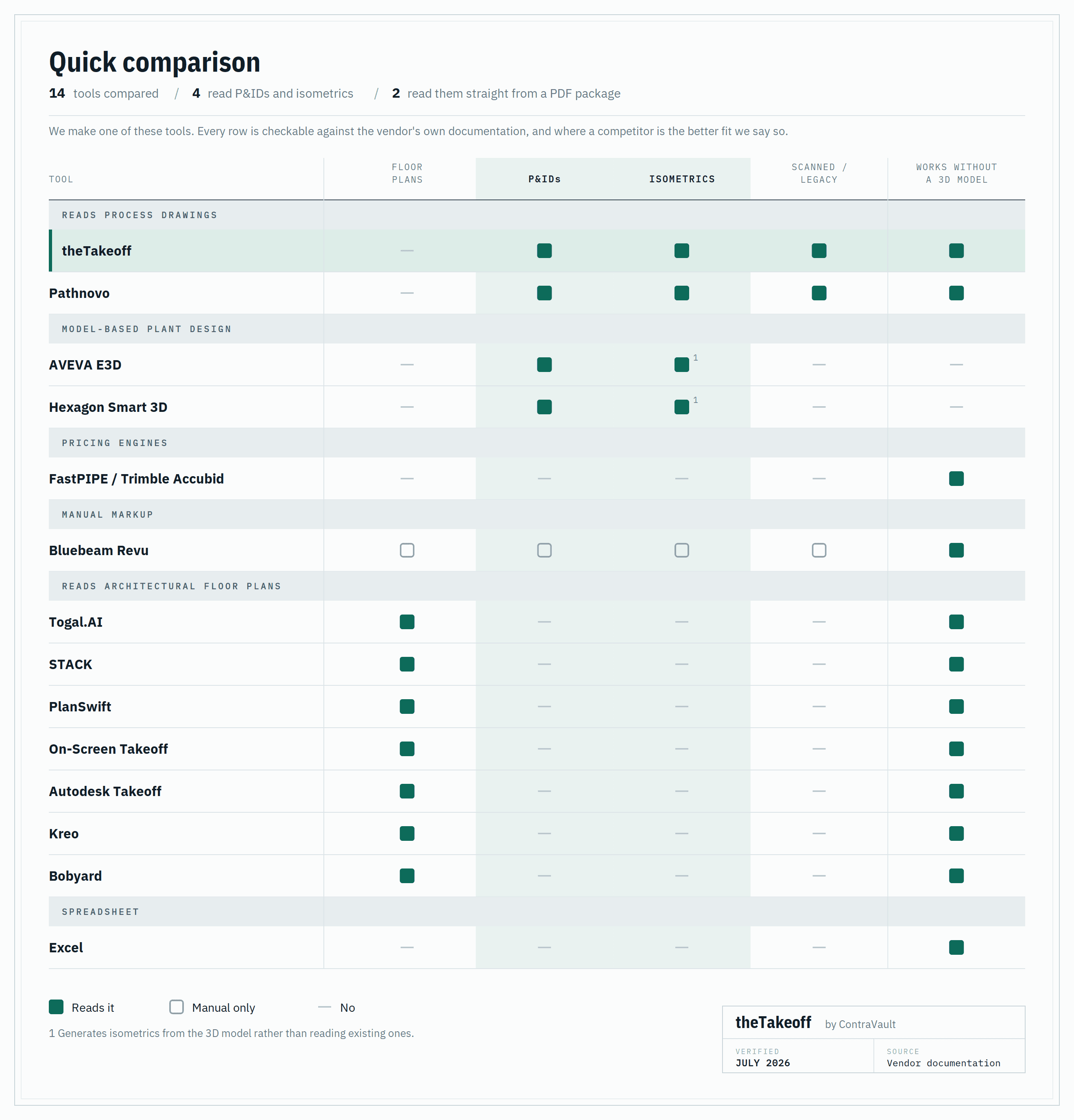
theTakeoff: AI takeoff software for P&IDs and Isometrics
Reads: P&IDs, isometrics, general arrangements, line lists, scanned and marked-up legacy drawings Best for: Piping, pipe fab and multi-trade industrial contractors bidding plant work
Does not do: Architectural floor plans
We built theTakeoff because our customers kept telling us the same thing. They had bought a takeoff tool, and it could not read a single drawing in their bid package.
It reads the drawing set the way an estimator does. It pulls line numbers off the P&ID and decodes them for size, service, spec and insulation. It follows continuations across sheets. It picks up valves, fittings, instruments and specialty items by tag. On isometrics it reads dimensions, produces a weld count, totals dia-inch and works out spool breaks. Then it cross-references the P&ID against the line list against the isometrics, so the same line does not get counted twice.
It also derives what is not drawn. Gaskets and stud bolts never appear as symbols on an isometric, but every flanged joint needs them. The system works them out from the joints it found and shows you the logic.
Scanned drawing takeoff works. Hand-marked revamp packages work. Most of our customers are bidding brownfield work, so this was never optional.
On accuracy, plainly. First-pass extraction sits around 70%. We publish that number because pretending otherwise would waste your time. No tool reading a marked-up 1980s isometric is at 98%.
What matters is what happens to the other 30%. Every quantity links back to the exact spot on the drawing it came from. Low-confidence items are flagged. You click the number, you see the drawing, you approve or correct it. An estimator still owns the takeoff. They just stop doing the counting.
The output is a priced bill of materials with labor hours applied, exportable to Excel.
On time saved, our own engagement data puts verified takeoff at well under half the manual hours on a mid-size industrial package. We are not publishing a single multiplier until the measurement covers enough customer packages to mean something. Ask us what the number looks like on drawings like yours and we will show you the working.
Where it does not fit: If you bid commercial building work, this is the wrong tool. Use Togal or STACK. And if you want a tool that files a finished number without anyone checking it, that is not what we built.
Pathnovo: P&ID and Isometric data extraction
Reads: P&IDs, isometrics, datasheets, tag registers, including hand-drawn legacy drawings
Best for: EPCs and owner-operators digitizing engineering document sets
Pathnovo is another serious name for reading process drawings, and they are good at it. They extract from P&IDs and isometrics, reconcile tag registers across document sets, and push structured data into systems like AVEVA P&ID and Hexagon SmartPlant.
For an EPC trying to build a reliable data set out of a folder of legacy PDFs, that is exactly the right shape.
The difference in one line, Pathnovo is a service: you send drawings, their team reviews the extraction, you get data back on their turnaround. theTakeoff is software your estimator drives. If your problem is a messy document set and you have time, that is a good trade. If a bid is due Friday, you need the tool on your own desk.
FastPIPE and Trimble Accubid: the pricing engines
Reads: Nothing automatically
This is what a lot of US mechanical estimators actually run, and the money engine is the real thing. Large item catalogs, MCAA labor units, spec-driven assembly, supplier pricing. If your quantities are already in hand, this is where they turn into a bid.
Takeoff is still click by click. They automated the math and left the reading to you, which is why estimators running Accubid still lose the week to counting. Pairing an extraction tool with an established mechanical estimating software stack is a reasonable setup. Nobody should rip out a working price book to solve a counting problem.
AVEVA E3D and Hexagon Smart 3D: model-based plant takeoff
Reads: Everything in the model
These are the serious plant design platforms. If your project has a live 3D model, quantities come straight out of it, and that is the most accurate takeoff available anywhere.
The catch is the model. Most contractors bidding a revamp, a tie-in or a turnaround never get one. They get a PDF package, sometimes scanned, often marked up by hand. These tools have no route into that.
Rule of thumb: Greenfield with a model: use the model. Brownfield with PDFs: you need a tool that reads documents.
Bluebeam Revu: manual P&ID takeoff and markup
Reads: Everything, manually
Bluebeam is not AI takeoff software and does not claim to be. It is a PDF tool, and it is very good. It opens your P&ID, you count valves with a count tool, you measure with a measurement tool. Most of our customers keep it, because it is the best markup and review tool available.
The limit is that you are still doing the counting. Forty isometrics is forty isometrics.
Togal, STACK, PlanSwift, Kreo and Bobyard: AI takeoff for architectural floor plans
These are good products in the wrong category for you.
Togal.AI is the clearest example, and to their credit they are upfront about it. Their own integration documentation states that Togal works with architectural floor plan PDFs only, and lists what it does not handle: elevations, sections, details, site and civil drawings, structural drawings, and mechanical, electrical or plumbing drawings. Their automated takeoff covers floor areas, room areas, wall lengths, and counts of doors, plumbing fixtures, appliances and furniture. On that job it is fast and well reviewed.
None of those outputs exist on a P&ID.
STACK, PlanSwift, On-Screen Takeoff, Autodesk Takeoff, Kreo and Bobyard are all built on the same assumption: a scaled drawing you can measure. They handle commercial building work well. Several have added AI-assisted counting for repeated symbols, which helps on simple sheets. None of them decode a line number or reconcile an isometric against a line list.
One clarification on numbers, since it comes up. Bobyard publishes a 70% automation figure, and we publish a 70% first-pass extraction figure. They measure different things. Theirs describes how much of a takeoff runs unattended. Ours describes how much of a first pass over a process drawing is right before an estimator checks it.
If you bid both commercial and industrial work, you will need one of these and a process drawing tool. They do not overlap.
Excel: the tool most industrial bids are still built in
Worth naming honestly, because it is what most estimators actually use.
The counting happens in Bluebeam or on paper. The numbers land in a spreadsheet that somebody built years ago and everybody trusts.
The problem is throughput. Across 312 US industrial estimating teams, the median desk prices 45% of the work it qualifies. The top quartile prices 68%, in the same market, off the same drawings. Nobody in that top quartile got there by counting faster in Bluebeam. When bids arrive faster than the team can count, the spreadsheet holds and the calendar does not, and the work you never priced never shows up in any report.
For scale, the same study puts a mid-size process piping package at 38 estimator-hours to price. At your own loaded rate, that is what one bid costs you to produce, win or lose.
How to choose?
Start with your drawings, not the feature list. Open your last bid package. If it is mostly P&IDs, isometrics and GAs, most of the market is irrelevant to you.
Then ask any vendor three questions:
-
Show me it running on my drawings, not a demo file. A tool that works on a clean sample and fails on your scanned revamp package is no use to you.
-
What is your first-pass accuracy, as a number? Anyone who says "highly accurate" is avoiding the question. Anyone claiming 98% on brownfield isometrics is guessing.
-
Can I trace every quantity back to the drawing? If you cannot check it, you cannot sign it. And you are the one signing it.
Match the tool to the job: Bidding plant work off PDFs → theTakeoff or Pathnovo Greenfield with a live 3D model → AVEVA or Hexagon Quantities already in hand, need pricing → FastPIPE or Accubid Commercial building work → Togal, STACK or Kreo Markup and review on any drawing → Bluebeam, alongside whatever else you use
FAQ
Can AI read a P&ID?
Yes, but only tools built for it. Reading a P&ID means decoding line numbers, following continuations across sheets, and identifying valves, fittings and instruments by tag. Tools built for architectural floor plans cannot do this, because a P&ID has no scale and nothing to measure.
Can AI read Isometric drawings?
Yes. Isometrics are more tractable than P&IDs for extraction, because they carry explicit dimension strings, BOM tables and fixed drafting conventions. A tool reading isometrics should give you a weld count, dia-inch totals and spool breaks, not just a component list.
Can you get pipe lengths from a P&ID?
No. A P&ID shows what connects to what, not how far apart it is. Lengths come from isometrics, scaled general arrangements, or a 3D model. Any tool claiming to measure pipe length off a P&ID is doing something you should look at closely.
What is MTO extraction?
Material takeoff extraction is the step that turns a drawing set into a quantified material list: every line, valve, fitting, flange, gasket and support, with size and spec attached. On industrial work the derived items matter as much as the drawn ones, because gaskets, stud bolts and supports are never symbols on the drawing.
What is the best takeoff software for piping?
It depends on what you have. For bidding off a PDF package, theTakeoff and Pathnovo are the two tools that read the drawings. For pricing quantities you already hold, FastPIPE and Accubid own that job. For a greenfield project with a live model, take the quantities from the model.
Can AI count welds from an Isometric?
Yes, if the tool is built for isometrics. Weld counting works off the joints and fittings the extraction identifies, which is also how dia-inch gets totalled. Ask to see it run on a marked-up drawing rather than a clean one, since that is where weld counts usually break.
Does Togal work for P&IDs?
No. Togal's own documentation limits it to architectural floor plan PDFs and excludes mechanical drawings. It is a well-regarded tool for the job it was built for.
What is the most accurate AI takeoff software?
It depends entirely on the drawing. Floor plan tools report very high accuracy on clean architectural plans. Nobody achieves those numbers on marked-up brownfield isometrics. Ask for a figure on drawings like yours, and treat any vendor who will not give one as having answered.
Will AI takeoff software work on scanned or hand-marked drawings?
Some will. theTakeoff AI and Pathnovo both handle scans and hand annotations, because brownfield work is the point. Floor plan tools generally need clean vector PDFs. Model-based platforms cannot use scans at all.
Do I still need an estimator?
Yes. These tools do the counting, not the judgment. Someone still has to check the extraction, apply the right labor units, price the risk and decide what to qualify out. That is the job. Counting was only ever what ate the week.
How long does a piping takeoff take?
It depends on the scope, which is why the numbers quoted around this vary so widely. Our own analysis of a full isometric takeoff on a typical refinery bid puts it near 875 hours across the package. For a single mid-size process piping package, the 2026 benchmark of 312 US industrial estimating teams puts it at 38 estimator-hours.